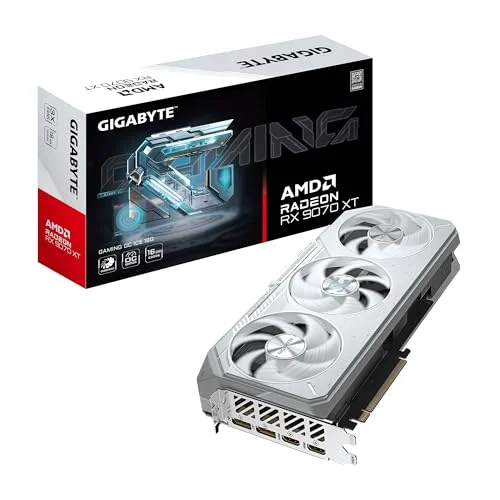
What we measured129 fps average at 1440p ultra · 178 fps average at 1080p ultra · 304 W power draw under load · 68 degrees C peak GPU temperature at 34 dBA fan noise. Tested June 2026, last updated June 2026, on our Ryzen 7 9800X3D bench.
AMD spent the last two generations being the value pick that you bought with an asterisk, the card that gave you more frames but worse ray tracing and a weaker upscaler. The RX 9070 XT is the generation where the asterisk mostly disappears. In Gigabyte's well-cooled Gaming OC trim it averaged 129 fps at 1440p ultra in our suite, more than any similarly priced Nvidia card, on a generous 16GB of GDDR6 across a wide 256-bit bus. Crucially, its FSR 4 upscaling has finally caught up to within touching distance of DLSS. At around £630 it is the card to buy if you want the most rasterised frames for your money, which is exactly why it is our best value pick.
Gigabyte Radeon RX 9070 XT Gaming OC: full specifications | GPU | AMD Radeon RX 9070 XT (RDNA 4) |
|---|
| Stream processors | 4,096 |
|---|
| Memory | 16GB GDDR6 |
|---|
| Memory bus | 256-bit |
|---|
| Boost clock (OC mode) | 2,970 MHz |
|---|
| Board power (TBP) | 304 W |
|---|
| Recommended PSU | 800 W |
|---|
| Power connectors | 2 x 8-pin PCIe |
|---|
| Outputs | 2 x DisplayPort 2.1a, 2 x HDMI 2.1b |
|---|
| Length / slots | 330 mm / 3-slot |
|---|
| Avg FPS, 1440p ultra | 129 fps |
|---|
| Typical UK price | £630 |
|---|
Who is the Gigabyte RX 9070 XT for?
The RX 9070 XT is the right card if you want the maximum number of rasterised frames for your budget and you have the case space to house it. In our suite it averaged 129 fps at 1440p ultra with 1% lows of 101 fps, the strongest 1440p figures of any card near its price, and at 1080p ultra it ran away to 178 fps. The 16GB buffer is the other headline: it gives the card real legs in modded and texture-heavy games where a 12GB card runs short, and it makes the 9070 XT a more credible occasional 4K option than the standard RTX 5070, hitting 71 fps at 4K ultra against the 5070's 62 fps. For competitive and fast-paced gamers who care about raw frames more than ray-traced reflections, it is the rational buy.
It is less suited to two groups. Players who chase ray tracing will find it trails the Nvidia cards: with full ray tracing enabled it dropped further than the RTX 5070 Ti in our heaviest title, so if path-traced lighting is your priority, Nvidia is the safer bet. And anyone with a small or compact case should look elsewhere; at 330 mm long and three slots tall, the Gigabyte Gaming OC is a large card that simply will not fit a tight build. The more compact Asus RTX 5070 is the easier physical fit there.
How the Gigabyte RX 9070 XT performs
Frame rates across resolutions
This card's whole case is raster performance, and the numbers back it up. At 1080p ultra it averaged 178 fps with 1% lows of 149 fps, comfortably the fastest 1080p card we tested. At 1440p ultra, its natural home, it hit 129 fps average and 101 fps lows, around 9% ahead of the RTX 5070 in the same scene. At 4K ultra it managed 71 fps average, enough for a smooth 4K 60 experience and noticeably better than the 12GB Nvidia card at the same resolution, thanks largely to that 16GB buffer not running short on textures. Turn on FSR 4 and it clears 100 fps even at 4K in most of our suite, which makes it a more flexible card than its reputation suggests.
Temperature, noise and power
The trade-off for all those frames is power and heat, and the RX 9070 XT draws more than its Nvidia rival: 304 W under sustained load against the RTX 5070's 250 W, and 19 W at idle. Gigabyte's large triple-fan cooler handles it well, holding the GPU at a peak 68 degrees C and the hotspot at 84 degrees C over a 30-minute run, but it works harder to do so, measuring 34 dBA from 30 cm, audibly louder than the very quiet Asus 5070 though still far from intrusive. If low noise and power are your priorities, the Nvidia card has the edge; if you just want the frames, the higher draw is an easy trade.
Features: FSR 4 and connectivity
FSR 4 is the reason this card is now easy to recommend. Earlier FSR versions shimmered and smeared in motion; FSR 4 produced a clean, stable image at 1440p in our testing, close enough to DLSS that most players would not notice the difference in normal play. The card also brings AMD's latest media encoder, much improved for streaming over previous generations, and a modern output set of two DisplayPort 2.1a and two HDMI 2.1b. Two standard 8-pin power connectors mean no 12V-2x6 adapter worries, which some buyers will prefer. The driver experience on RDNA 4 was stable throughout our testing, a marked improvement on AMD's rockier launches in past years.
The honest downsides
There are two. First, ray tracing remains AMD's weaker hand. The 9070 XT is much improved over previous Radeon cards and is perfectly playable with ray tracing on, but in our most demanding path-traced scene it gave up frames to the RTX 5070 Ti in a way that matters if heavy ray tracing is central to the games you play. Second, the physical size and power draw are real. At 330 mm and 304 W with an 800 W recommended PSU, this is a card that demands a roomy case and a capable power supply, so some buyers stepping up from an older mid-range build will need to budget for a power-supply upgrade as well as the card.
The good
- 129 fps at 1440p ultra, the most raster per pound here
- 16GB buffer gives real headroom at 4K and in mods
- FSR 4 finally rivals DLSS for image quality
- Two standard 8-pin connectors, no adapter
- Stable RDNA 4 drivers throughout testing
The not-so-good
- Ray tracing still trails the Nvidia cards
- Thirsty: 304 W draw needs an 800 W PSU
- Large 330 mm board will not fit small cases
- Louder under load than the Asus RTX 5070
Best for: the value-focused 1440p gamer who wants the most rasterised frames per pound and a 16GB buffer, and has the case and PSU to run it. Not the pick if ray tracing is your priority (try the RTX 5070 Ti) or your case is small (try the Asus RTX 5070).