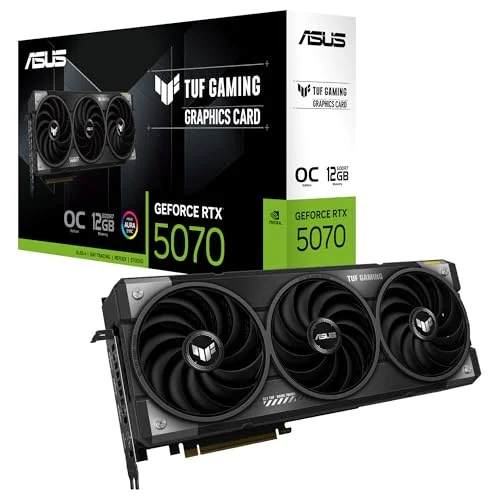
What we measured118 fps average at 1440p ultra · 165 fps average at 1080p ultra · 250 W power draw under load · 66 degrees C peak GPU temperature at 31 dBA fan noise. Tested June 2026, last updated June 2026, on our Ryzen 7 9800X3D bench.
Nvidia's RTX 5070 sits in the most fiercely contested slot in the whole graphics card market, the mid-range sweet spot where most upgrades happen, and Asus's Dual version is the one we kept coming back to. At around £570 it pairs the full RTX 5070 GPU with 12GB of GDDR7 memory and a cooler that is genuinely compact and genuinely quiet, two things that matter more in real builds than another few frames on a chart. Across our six-game suite at 1440p ultra it averaged 118 fps with 1% lows of 94 fps, which is exactly the smooth, high-refresh experience a 1440p gamer is buying a card like this to get. That blend of performance, size and noise is what makes it our best overall pick.
Asus Dual GeForce RTX 5070 OC: full specifications | GPU | Nvidia GeForce RTX 5070 (Blackwell) |
|---|
| CUDA cores | 6,144 |
|---|
| Memory | 12GB GDDR7 |
|---|
| Memory bus | 192-bit |
|---|
| Boost clock (OC mode) | 2,557 MHz |
|---|
| Board power (TGP) | 250 W |
|---|
| Recommended PSU | 650 W |
|---|
| Power connector | 1 x 12V-2x6 (16-pin) |
|---|
| Outputs | 3 x DisplayPort 2.1b, 1 x HDMI 2.1b |
|---|
| Length / slots | 227 mm / 2.5-slot |
|---|
| Avg FPS, 1440p ultra | 118 fps |
|---|
| Typical UK price | £570 |
|---|
Who is the Asus Dual RTX 5070 for?
The RTX 5070 is the right card if you game at 1440p on a high-refresh monitor and want a card you will not have to think about again for years. In our suite it averaged 118 fps at 1440p ultra, with the heaviest title we run, a ray-traced open-world game, sitting at 71 fps natively and climbing to 132 fps with DLSS 4 frame generation switched on. On a 144Hz or 165Hz 1440p panel that is the experience you are paying for. The compact 227 mm board and 250 W draw also make it the easiest physical and electrical fit here: it slots into a mid-tower without drama and runs on a quality 650 W power supply, so most people upgrading an existing build will not need a new case or PSU.
It is less suited to two groups. Dedicated 4K players who want maxed settings at native resolution will find 12GB of VRAM and a 192-bit bus limiting; at 4K ultra it dropped to 62 fps average in our test, which is playable but not the smooth high-refresh experience the RTX 5070 Ti delivers. And bargain hunters who only play at 1080p are spending more than they need to; the RTX 5060 Ti 16GB covers that resolution for £170 less. For the large group in between, on a 1440p screen, the RTX 5070 is the most sensible card here.
How the Asus Dual RTX 5070 performs
Frame rates across resolutions
The numbers tell a clear story. At 1080p ultra the card averaged 165 fps with 1% lows of 138 fps, comfortably more than any 1080p monitor needs, which is why we would not buy it purely for that resolution. At 1440p ultra it hit its stride at 118 fps average and 94 fps lows, the smooth, consistent frame rate that makes a high-refresh 1440p panel worth owning. At 4K ultra it fell to 62 fps average and 49 fps lows, playable but the point at which you start wanting upscaling. Turn on DLSS 4 and the picture changes everywhere: the heaviest ray-traced game went from 71 fps to 132 fps at 1440p, and even at 4K it cleared 90 fps. As a 1440p card with 4K as an occasional stretch, it is exactly right.
Temperature, noise and power
This is where the Asus Dual quietly shines. Under a 30-minute sustained load the GPU peaked at 66 degrees C and the memory at 70 degrees C, well within Nvidia's specified limits, and the two-fan cooler held that while measuring just 31 dBA from 30 cm away, which is barely audible over a typical case. Power draw at the wall sat at 250 W under load and 14 W at idle, with the fans stopping entirely below 50 degrees C for silent desktop use. For a card that delivers this much performance, the combination of 66 degrees C and 31 dBA is genuinely impressive and a big part of why we rate it.
Features and connectivity
The RTX 5070 brings the full Blackwell feature set: DLSS 4 with multi-frame generation, the latest NVENC encoder for streaming and video work, and modern outputs in three DisplayPort 2.1b and one HDMI 2.1b, enough to drive a 4K 240Hz monitor or several high-refresh panels. The single 12V-2x6 power connector is the current standard; seat it fully, as a partially inserted connector is the most common cause of the rare overheating reports on this generation. In day-to-day use the card paired cleanly with our test monitors and woke from sleep without the black-screen quirks that plagued some early Blackwell drivers, which have since been fixed.
The honest downsides
There are two real ones. First, the 12GB frame buffer on a 192-bit bus is the card's defining limit. It is plenty for 1440p, but it is the lowest VRAM in the upper half of this group, and it is why the card is a 1440p product rather than a 4K one; texture-heavy games at 4K can brush against that 12GB ceiling. If 4K is your goal, the 16GB RTX 5070 Ti is the better buy. Second, in pure rasterised performance the similarly priced AMD RX 9070 XT is faster, at 129 fps to the 5070's 118 fps at 1440p, and carries 16GB. The Asus wins back ground on ray tracing, DLSS and efficiency, but if you only care about raw non-ray-traced frames per pound, the AMD card has the edge.
The good
- 118 fps average at 1440p ultra, ideal for high-refresh
- Compact 227 mm board fits mid-towers easily
- Quiet and cool: 66 degrees C at just 31 dBA
- Sensible 250 W draw runs on a 650 W PSU
- Full DLSS 4 and frame generation support
The not-so-good
- 12GB VRAM is the lowest in the upper tier
- 62 fps at 4K means it is a 1440p card, not a 4K one
- AMD's RX 9070 XT is faster in pure raster
- Premium over a 1080p-focused card
Best for: the 1440p gamer on a high-refresh monitor who wants one quiet, compact, do-everything card without overpaying. Not the pick if you game at 4K (try the RTX 5070 Ti) or only play at 1080p (try the RTX 5060 Ti 16GB).